Conversion Chamber 14
Experiment Log 43-3/H1, Log of the First Quarter of Fourteen, Galactic Date two-three-seven-three, stationed forty-three parsecs from the third liminal.";
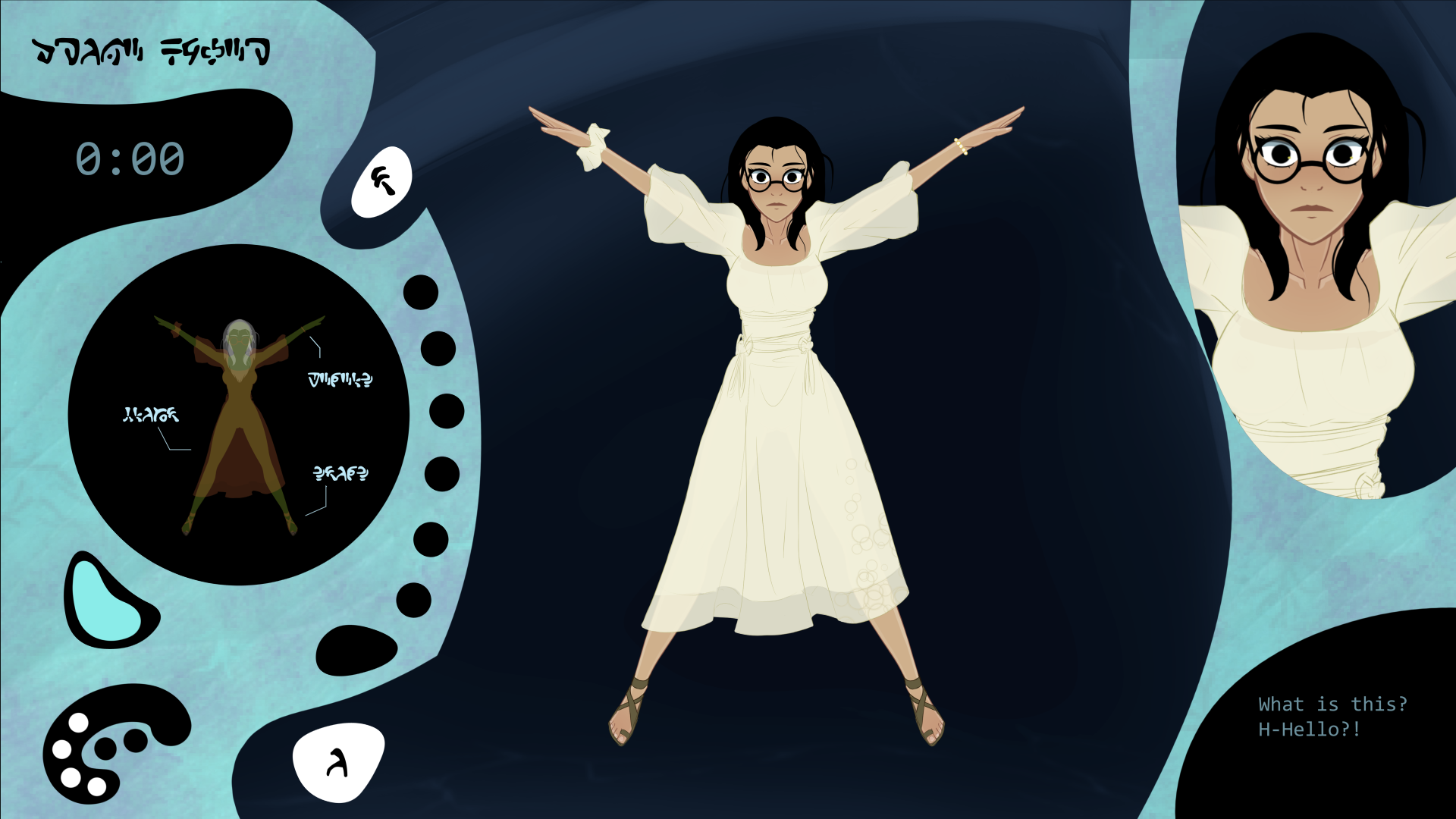
The subject for today's experiment is a female 'human', a species recently catalogued as part of a collection of samples from a mid-range survey mission.
After a scan of its neural matrix, I theorize this subject- despite being comfortably above the CogScale average- may already be primed for servitor-level conversion without the need for expensive preliminary adjustment or enhancement.
If I am correct, and this trait carries over to others of its kind, then I estimate this remarkable species will have a market value approaching that of the duun.
This is a theory in need of testing. I have made a few adjustments to the conversion procedure to take advantage of its unusually large pleasure centres, and am now ready to begin the experiment...
_________________________________________________________________
Hey all, TDL here! And here's my entry for Hypnovember- Conversion Chamber 14! Yeah it's over a week late...but this whole thing didn't even exist as a concept until, like, the 2nd week of month! Gimme a break here!
Anyway, it's something of an interactive, animated lore-log, with orbs and widgets and a tastefully nude subject for you to tastefully drone up...so long as you can grasp the Conversion Chamber's alien interface, that is.
Guess you'll need to poke around a bit, eh?
Many many thanks to my lovely patrons who have provided exceptional support for me while I worked on this- and indeed my community in general- if you like what you see here, feel free to support me on Patreon, or just enjoy a bunch of my works from a safe distance on DeviantArt!, Hentai Foundry, Pixiv or Hypnohub!
Whatever you fancy really. Man, there' so many places to post these days, do I need to hyperlink 'em all? Passsss!
Anyway, enough blah blah. Thankyou for checking this out, and do drop a comment if you even vaguely feel like it- I do want to know what y'all would like to see and, indeed, did like seeing, and what dreams you might have for the future!
Enjoy!
____________________________________
Sounds (either as base for remixing or not) were provided by the following artists-
Janet Ialla-hamblin, aesterial-arts, aarrnnoo, silverillusionis, sundayrecords, newlocknew, funnyvoices, thehorsevalse, and...myself! \:D/
Comments
Log in with itch.io to leave a comment.
how do I “sync up the remaining receptors”?
Hallo,
Dein Game ist sehr interessant, weil Dronen mich auch interessieren. nur komme ich aktuell nicht weiter im Game. Das für ein Kommando soll ich eingeben, das die Drone zum Leben erweckt ? Sont das Game richtig cool . :)
This doesn't seem to work. after the Unity logo vanishes I get some back ground noise but the screen remains black. clicking and pressing buttons does nothing.
I have the same issue.
Stuck on the second stage of the mental connections. i see the sliderbar up top and the three buttons but nothing happens when i tap them.
I'm stuck after the message "...That response was...unusual. But not necessarily bad. Let's try and activate her." when I press the button beneath the neural net diagram (For lack of a better term) it just says "command invalid"
You have to type in "awaken", then hit the white button just above the text-field.
Ah okay, thanks!
This a tip to the activation keyword: “Activate”. Awaken works too just fine.
Okay, so I've managed to do the slider so her clothes are scanned...
Now what? I've tried clicking and dragging everything I can think of! I give up, can someone give me a hint?
tap clothes and swipe them away
What do I do after the slider thingy
What to do after plug?
Any clues as to what to do after you get her helmet on? I'm stumped
It’s probably downloading the emotions to her brain in a robotic way?? Smth like that?
Turn on all the buttons on the left side. Next activate the bar over her head clicking when the dot activates the lamp. Adjust the earcup devices over her ears and repaet the provcess untill the subject is apparatus is fully calibrated. Click on the activation aparatus on the right side of the subject and follow the sequence of the colors. Press the activation and wait until end of the process. Put the activation keyword: Activate or Awaken. The two works just fine.
I don't know why I wonder what it will feel like being in the Conversion Chamber...
A very good and enjoyable experience, judging by the reactions of the subject in conversion camera 14. Just watching and imagining it is something extraordinary and from another world.
Just adjust the device on the target. Put the bateries on the charger. Click on the charge before put the bateries back where they are. Adjust collar device on her neck. Adjust the mesures of the helmet till the cicles are blue. Have fun trying the turn on the buttons; And enjoy the rest of the game. Pay attention to the Experiment Log. The tip for the Password is said. You can use Activate or Awaken to go to the next fase.
how do i adjust teh device
With the mouse ir with the point of the pen, for móbiles. For me using the fingers is almost an impossível task.
WHAT IS IT THEN
Tutorial Step by Step
1 - Click on Begin
2 - On the right side of the screen is the diary, which describes what he is doing and the subject's reactions. Listen carefully to understand what to do next. If you don't understand, follow the instructions below.
3 - On the left side of the screen are the controls that interact directly with the subject. a) Click and hold the button below the circle until the circle is fully illuminated.
b) On the left side of the screen, after the subject wakes up, click and drag the button on the bar below the circle from left to right.
c) Notice that the clothes and accessories now appear in the circle with a different shade than the rest of the subject.
d) In the middle, circles and wires appear connecting each accessory, sandals, and clothing. Click on all the circles and see that the panel on the left reacts.
e) On the left side of the screen, after clicking on all the circles, click and drag the button on the bar below the circle from right to left.
f) The clothes and accessories will disappear in a blinding beam of white light. The subject will close their eyes, only to be surprised and very embarrassed.
g) On the left, a probe will appear below the circle. Place the probe inside the subject where the concentric circles point; this will make the subject very uncomfortable.
h) A panel will open with five white objects and a button below with five cells. Click and drag each of the objects to a cell. Do not place more than one in the same cell. Or you will have to restart the game. After placing all the objects, a cover will appear over the five cells. Click on it.
i) Remove each of the recharged objects and place them in the cells where they were. The order does not matter. They all perform the same function.
j) Place the necklace on the subject. A blinding white light will appear over the subject's body. And a silver jumpsuit will appear and cover the subject from the neck down, leaving the subject strangely exhausted.
k) In the middle circle, two circles and wires will appear as in step 'd)'. Adjust the buttons so that the wires are in the direction of the subject's ears. When the button turns blue, a sound will alert you that the position is correct. Then click on the blue circle.
l) A helmet will appear below the circle on the left. Place the helmet over the target area following the concentric circles.
m) Click and drag the button vertically from top to bottom.
n) The subject's hair and eyebrows will light up in a blinding white. The subject will close their eyes, and observe their reaction carefully immediately after opening them.
o) Click the buttons and watch the lights turn on inside the helmet representation, and carefully observe the subject's reactions.
p) Click and hold the button below the circle until the circle's color changes completely.
q) Pay close attention to what each color does to the subject.
r) These steps need to be repeated three times - Click and drag the green devices over the helmet's eracups. A sound will indicate activation. Pay attention to the subject's reaction. Then activate the three circles by clicking exactly when the button passes through the crossed lines.
s) After completing the four brainwave calibrations of the subject with the helmet, it is now necessary to activate the helmet. On the left, click and hold the button below the circle until it changes color. The subject will react. Five circles will appear in the middle. Four colored and one with only a faint golden halo. Click this button. A sequence will be shown. Click the colored buttons following the sequence.
t) Pay attention to the subject's reactions. See how each ray illuminating the top of the helmet makes it react differently. Click the button with a faint golden halo. And carefully observe the subject's reactions.
u) On the left, a place will appear to write the activation command for the newly created "servitor". Enter the activation keyword: Activate or Awaken. Both work very well.
Note that the mindless servitor opens its eyes awaiting commands.
On the left, click on the helmet. A sound will announce activation. In the middle, drag the white object to the three cells and only then place it back where you took it from.
Fantastic stuff!
(^▽^)